Display callee information (On: true, Off: false, Default: true)
lang
string
No
Current display language (default display English)en: English, es: Spanish
closeInitiateCall
Boolean
No
Whether to disable proactive dialing (default is not disabled). false: not disabled, true: disabled
                Example:
<!DOCTYPE html>
<html lang="">
<head>
  <script src="https://cc-sdk.itniotech.com/sip-sdk.js"></script>
</head>
<body>
  <!-- sdk Component -->
  <cc-sdk id="sdk"></cc-sdk>

  <script type="module">
    import http from 'axios'

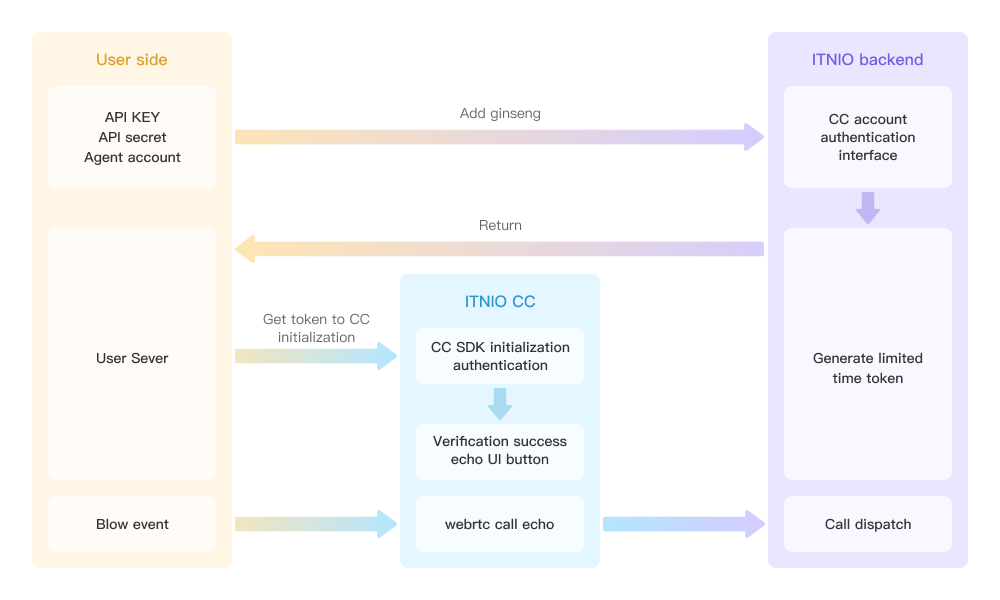
    //1. In order to ensure the security of authentication information, the customer system backend service needs to implement SDK authentication capabilities and expose the interface to the customer frontend for use. The customer backend system access authentication capability document can be seen (https://www.itniotech.com/api/call/ccsdkAuthentication/)
    //2. The 'https://xxx.xx.cn/createAuth' path needs to be replaced with the customer system backend interface
    //3. Overall request path description: [Customer system frontend]->[Customer backend interface]->[Our API interface]
    //4. SDK registration only requires one line of code window.ccSdk.register({token:xxx}). The post request sent in the example below is only for reference. The purpose is to obtain token from the backend interface. The specific implementation logic can be customized
    http.post('url', res => {
      window.ccSdk.register({
        token: res.data,
        noWorkMode: false,
        isRemark: true,
        isInformation: true,
      })
    })
  </script>
</body>
</html>
Listening to SDK Agent Status.
To listen to the status of the SDK agent, add an ID to the SDK component and use addEventListener to listen for the onSeatStatus callback, e.g.,
Note: Calling this method while the current call is still in the post-call processing state will immediately submit and end the call, starting the next call. Calling this method is not allowed when the call is ringing, calling, or in a call.
Callback Parameters
Parameter
Type
Required
Note
option
phone
string
Yes
The number to dial
info
string
No
Called information (up to 1000 characters, truncated if exceeded)
callback
code
number
No
0: Success, 999901: Invalid number, 999905: Only available for operation, 999906: Submission failed.
message
string
No
Information returned by the current call answering operation
                Example:
<!DOCTYPE html>
<html lang="">
<head>
  <script src="https://cc-sdk.itniotech.com/sip-sdk.js"></script>
</head>
<body>
  <button id="call">Dial</button>
  <!-- sdk Component -->
  <cc-sdk id="sdk"></cc-sdk>

  <script type="module">
    import http from 'axios'

    http.post('url', res => {
      window.ccSdk.register({
        token: res.data,
      })
    })

    const sdk = document.getElementById('sdk')
    const callButton = document.getElementById('call')
    callButton.onclick = () => {
        const data = {
            phone: '13212345678', // Number to call
            info: 'John Doe 20 years old 461385413131', // Called information
        };
        sdk.callPhone(data);
    };

  </script>
</body>
</html>
Event - Reconnect WebRTC
Reconnect WebRTC. Add an ID or ref to the SDK component and call the callPhone() method, for example:
                  Example:
id.reConnectWebrtc()
Friendly reminder: Call this method only when the WebRTC status is "not connected", i.e., when the onWebrtcStatus callback returns 0. It is also recommended to set a limit on the number of reconnection attempts.
Add an ID or ref to the SDK component and call the `switchStatus(value)` method. Note that this method must be placed below the declaration of an async function; otherwise, `await` will throw an error. For example:
                  example:
async function switchFn() {
    const res = await id.switchStatus(value)
}
Parameter Examples
Parameter
Type
Description
value
number
Seated state: 2: Showing leisure; 5: Taking a short break.
Callback Parameters
Parameter
Type
Description
res
The return value of switchStatus is either 0 (indicating a successful call) or 0 (indicating an exception).
code
number
0: Switching successful; 999001: Switching is not allowed.